






On October 19, 2026, Microsoft announced an update for the Entra Global Secure Access (GSA) client. This latest release, v2.34.222, adds support for a new sign-in option, updates Conditional Access sign-in frequency, improves diagnostics, and enhances local network bypass. It also improves Windows Firewall behavior off network, along with telemetry and accessibility improvements.
Changes in v2.34.222
GSA client v2.34.222 includes the following new features and enhancements.
Web Sign-In
The GSA client now supports Web sign-in for Windows. This credential provider enables browser-based Windows sign-in using methods such as Microsoft Authenticator, Temporary Access Pass (TAP), or a SAML-P federated identity. Web sign-in requires a Microsoft Entra-joined device running Windows 11 version 22H2 with KB5030310 or later, plus internet connectivity.
Windows Firewall Profile
This release improves Windows Firewall profile selection when Private Access is enabled. When the device is not directly connected to the corporate network, Windows Firewall does not activate the Domain profile.
Traffic Forwarding Profile Details
The new GSA client features improved diagnostics. With this update, the Forwarding profile tab in the Advanced diagnostics section now displays the Traffic Forwarding Profile Name as it appears in the Entra admin center, along with the Traffic Forwarding Profile ID.
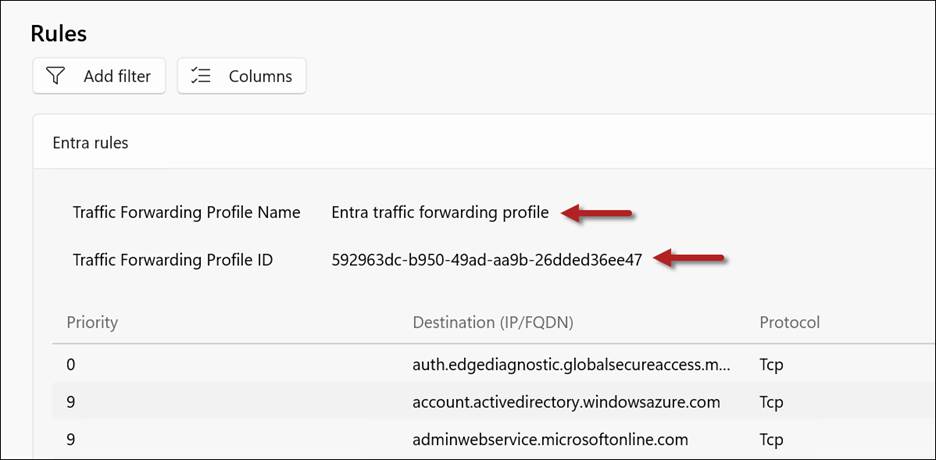
Traffic Forwarding Profile Name and ID
Conditional Access
GSA client v2.34.222 now includes support for Conditional Access sign-in frequency for Private Access applications. This feature is part of a phased rollout and might not be available in all tenants immediately.
Prefer Local Network Bypass
With this update, the Prefer local network option limits bypass to connections destined for IP addresses in common private network ranges. Microsoft documentation doesn’t elaborate on specifically which ‘common private network ranges’, but I suspect this means private IPv4 address ranges as defined in RFC 1918.
GSA Traceroute Changes
In GSA client v2.34.222, Microsoft has replaced the command-line version of the GSA traceroute tool (GsaTracert.exe) with a new GUI version. However, during my initial testing (and confirmed by others testing this feature), it appears to be broken at this time. When I launch GsaTracert.exe, the UI returns the following error message.
“Could not retrieve the forwarding profile from the registry. Ensure the Global Secure Access Client is installed and running.”

I will post an update as soon as Microsoft resolves this issue.
Additional Changes
In addition to the changes highlighted above, the new GSA client includes the following additional enhancements.
- UDP tunneling improvements
- Memory utilization improvements
- New telemetry capabilities
- Accessibility improvements
- Bug fixes and other miscellaneous improvements
Summary
GSA client v2.34.222 introduces several useful enhancements for administrators and users. Organizations should validate the update against their existing configuration before broad deployment. My initial testing also identified an issue with the updated diagnostic tool, as described above.
Additional Information
Microsoft Entra Global Secure Access Client v2.34.222
Microsoft Entra Global Secure Access (GSA)
Microsoft Entra Private Access
Microsoft Entra Internet Access
Entra Private Access and VPN Migration Strategies on Entra.News


