The Microsoft Entra Private Network Connector is a lightweight on-premises software agent that enables Microsoft Entra Private Access to forward Global Secure Access (GSA) client traffic to internal resources. In environments with multiple connectors, traffic is normally distributed across available connectors in a connector group. While this improves resiliency and load distribution, it can create challenges for applications that rely on a consistent connector source IP address.
Stateless Connectors
By default, requests are distributed randomly among the available connectors in a connector group. Traffic forwarded to the internal resource uses the connector server’s IP address as its source. Consequently, separate connections from the same user and device can reach the application through different connectors. Importantly, session state is not shared among connectors in a connector group. As such, applications that associate session state with the source IP address may reject or interrupt these connections.
Why Session Persistence Matters
In some scenarios, an internal application might allow access only from specific connector IP addresses or associate an authenticated session with the source IP address. Random connector selection can cause subsequent connections to arrive from a different address, potentially interrupting the session. Session persistence reduces this risk by consistently using the same connector for the user and device.
Session Persistence
Microsoft recently introduced session persistence for Entra Private Access applications. When enabled, requests from the same user and device are consistently routed to the same connector for the duration of the session. This helps maintain a consistent connector egress IP address for applications that depend on source IP addresses for authentication, authorization, or session management.
Traffic Routing
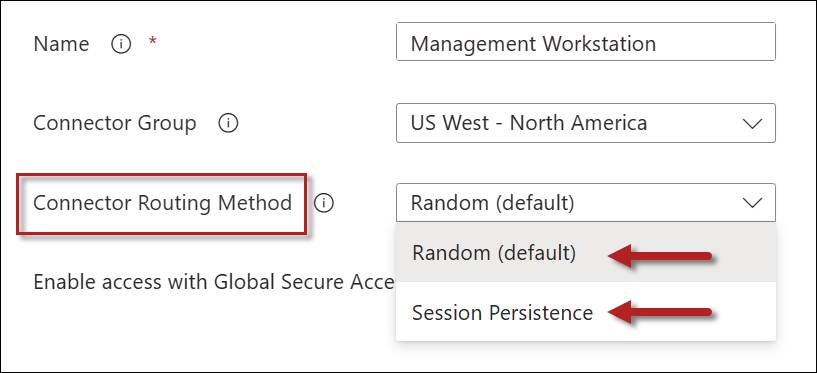
The connector traffic routing method is configured on a per-application basis. Traffic routing methods can be defined on Quick Access or Enterprise applications, and the setting can be configured on the Network access properties tab. Administrators have two options: Random or Session Persistence.
Random
This is the default behavior for the Private Network connector. All new connections are distributed randomly among connectors in the connector group.
Session Persistence
Selecting the Session Persistence option consistently routes requests from the same user and device to the connector on which the session was established.
Connector Routing Method Comparison
The following table summarizes these configuration options.
Routing Method
Benefits
Considerations
Random
Better distribution across connectors in a connector group
Source IP address may change between connections
Session Persistence
Consistent connector egress IP address
May not distribute sessions as evenly as the Random method
Failover
If the preferred connector becomes unavailable, subsequent traffic may be routed through another available connector. Applications that depend on the connector’s source IP address might require the user to establish a new session.
GSA Applications Only
Session persistence applies only to Global Secure Access applications. It is not supported for applications published using Microsoft Entra Application Proxy.
Summary
By default, Microsoft Entra Private Access distributes requests randomly among available connectors. Although this provides load distribution, it can create problems for applications that depend on a consistent connector source IP address. Session persistence addresses this issue by consistently routing traffic from the same user and device through the same connector for the duration of the session. This feature applies only to Global Secure Access applications and is not supported for Microsoft Entra Application Proxy applications.
The Entra Private Network Connector v1.5.4892.0 now includes a diagnostic tool on the system tray. This gives administrators a visual indicator of connector status and provides quick access to diagnostics and log files.
Diagnostics
Right-clicking the connector and choosing ‘Connector diagnostics’ launches the Connector Diagnostics window. Here you’ll find three tabs: Overview, Health Check, and Advanced Logs.
Overview
The Overview tab provides details about the connector, such as the Tenant ID, Connector ID, version, supported TLS versions, the connector server’s IPv4 address (IPv6 information is not displayed), the server’s hostname, and the operating system version.
Health Check
Clicking on the Health Check tab will perform a comprehensive system health check. Status information for each check is provided, indicating whether it is Passed or Failed. Optionally, administrators can export the report in text, HTML, or JSON format for further analysis. Each health check can be expanded to reveal additional information about the individual check.
Advanced Logs
Clicking the Advanced Logs tab allows administrators to retrieve detailed log information. Session channel logging is enabled by default but can optionally be disabled if needed. You can choose specific start and end dates and times to collect logs, then click Retrieve Logs to collect them.
Once complete, it’s not immediately obvious where to find these logs. Clicking the Logs Retrieved button prompts the administrator to select a location in which to save the log files.
Improvements
This update improves the reliability of name resolution by filtering invalid DNS responses. In addition, the update improves connector logging to the Windows Event Log and fixes various issues and bugs.
Updating to v1.5.4892.0
Existing Entra Private Network Connector installations will not automatically receive this update. Administrators must manually download the connector from the Microsoft Entra admin center and apply the update themselves to take advantage of these new features and capabilities.
The predominant solution for secure remote access today in the Microsoft ecosystem is Always On VPN. Always On VPN is based on traditional Virtual Private Network (VPN) technology originally developed in the mid-1990s. However, Microsoft recently introduced Entra Private Access, which is part of the Global Secure Access (GSA) Security Service Edge (SSE). Entra Private Access is an identity-centric Zero Trust Network Access (ZTNA) solution designed to replace traditional VPN solutions. It offers significantly improved security with granular resource access without dependency on on-premises infrastructure. This article outlines where each solution fits best and how organizations can transition safely between them.
Always On VPN
First introduced in Windows 8, Microsoft Always On VPN provides seamless, transparent, secure remote access using client-based VPN protocols such as Internet Key Exchange version 2 (IKEv2) and Secure Socket Tunneling Protocol (SSTP). When establishing a VPN connection, a virtual network adapter is created, and an IP address is assigned to the interface to facilitate tunneled network communication with the internal network.
Architecture
Always On VPN requires substantial on-premises supporting infrastructure. In addition to the VPN servers themselves, administrators must also deploy authentication servers (RADIUS or NPS) and certificate services (AD CS). Administrators must manage public TLS certificates for SSTP connections. Also, larger deployments may require on-premises load balancers and/or cloud-based Global Server Load Balancing (GSLB) solutions. Further, additional configuration is needed to integrate Entra ID Conditional Access. Because this infrastructure must be publicly accessible by design, it becomes an attractive target for attackers. In addition, the complex infrastructure has many interdependencies, resulting in significant administrative overhead for network and security administrators.
Access Model
Most commonly, Always On VPN provides full network access to the internal network. Full network access is accomplished by configuring IP routing on the client to ensure internal client network subnets are routed over the VPN tunnel. In this model, clients are often implicitly trusted once connected. Once authenticated and authorized, users receive full, unfettered access to the internal network across all protocols and ports. This level of access introduces a significant security risk and does not adhere to modern zero-trust network access models. To address this, administrators must implement additional security controls internally (perimeter or DMZ firewalls) to restrict network access for Always On VPN clients.
Zero Trust Always On VPN?
Always On VPN includes support for traffic filters that can restrict network access and provide zero-trust-like access. However, these controls exist only on the client side, so an attacker with administrative access to the endpoint can easily bypass them. They should not be considered a reliable way to enforce zero trust for Always On VPN connections.
Entra Private Access
Entra Private Access is part of Microsoft’s Global Secure Access (GSA) Security Service Edge (SSE). It is a robust, cloud-based zero-trust network access (ZTNA) service that provides granular access to on-premises resources. It requires installing a client-side agent and one or more Private Network connectors on-premises to facilitate remote network access. Entra Private Access deeply integrates with Entra ID, so you can easily configure Conditional Access policies for any published resource, including multifactor authentication for legacy protocols such as SSH.
Limited Network Access
Unlike legacy VPNs, GSA does not create a virtual network interface when establishing a connection. Instead, GSA operates as a filter driver deep in the Windows networking stack, intercepting and rerouting network traffic bound for the internal network. The GSA client eliminates the complexities of IP address management, network routing, and firewalling. In addition, authentication and authorization are handled natively by Entra ID and Conditional Access.
Minimal Infrastructure
Entra Private Access is a cloud-based service with minimal on-premises supporting infrastructure requirements. Administrators must only deploy the Entra Private Network connector on one or more on-premises servers to facilitate remote access for Global Secure Access clients. The Entra Private Network is a lightweight software agent that requires little to no post-deployment support. The administrative burden is much lighter compared to Always On VPN.
Key Differences at a Glance
The table below highlights the most important architectural, security, and operational differences to help determine which solution best fits your environment.
Aspect
Always On VPN
Entra Private Access
Architecture
On-premises VPN gateway(s)
Cloud-based service
Access Model
Full network access via a routable IP address assigned to the endpoint
Per-resource zero-trust network access (ZTNA); no full network access
Authentication
On-premises AD or Entra ID (AD-synced accounts only)
Entra Private Network connector (minimum one server, two recommended for redundancy)
Device Support
Windows only
Cross-platform (Windows, macOS, iOS, Android)
Licensing
Included in OS license
Additional per-user costs with Entra Suite or standalone Entra Private Access license
Advantages of Always On VPN for Domain-Joined Endpoints
Always On VPN integrates more naturally with classic Active Directory domain-joined Windows devices. Always On VPN includes features that Entra Private Access does not currently provide, which administrators may require to provide full support for their mobile devices.
Device Tunnel Support
The Always On VPN device tunnel provides machine-based pre-logon connectivity. The device tunnel ensures access to on-premises authentication services (domain controllers) before the user logs on to the endpoint. The device tunnel allows for logging in without cached credentials (e.g., for new users) and streamlines password changes. In addition, it ensures network access to support complete group policy processing for remote users. Entra Private Access is user-based only and does not include device-based connectivity. The device tunnel is one of the most significant functional gaps between Always On VPN and Entra Private Access.
Note: Although device-based connections are not currently available in Entra Private Access at the time of this writing, Microsoft may add the feature in the future.
Windows Native Integration
Always On VPN leverages the built-in Windows VPN client, which integrates deeply with the operating system. The Windows VPN client is mature and robust, supporting secure authentication protocols with certificates or smart cards. Always On VPN requires no additional client software. For Entra Private Access, administrators must deploy and manage a separate software component, the Global Secure Access client.
Full Network Access
The domain is a trust boundary, and domain-joined endpoints require broad network access to function. For example, domain-joined endpoints must have access to domain controllers, and most access those resources using several protocols and numerous different ports. In addition, these endpoints must be able to connect to a variety of other internal resources, such as DNS servers, certification authorities (CAs), revocation servers (HTTP, OCSP, LDAP), systems management servers, file shares, printers, and more. Furthermore, much of this access occurs via Remote Procedure Call (RPC) and Distributed COM (DCOM), which use ephemeral (dynamic) port ranges (49152-65535). Enforcing firewall policy to restrict access for remote domain-joined clients is challenging because these endpoints require significant resources.
So, if your managed endpoints are primarily domain-joined and depend on pre-logon network connectivity, Always On VPN remains the more mature and feature-complete choice today.
Why Entra Private Access is Ideal for Native Entra ID Joined Devices
Entra Private Access is designed around a cloud-first, identity-centric Zero Trust model and has explicit client and device requirements that align best with Entra ID joined devices.
Client Requirements
The Global Secure Access client required for Entra Private Access requires Windows devices to be Microsoft Entra-joined or Microsoft Entra hybrid-joined. Domain-joined only (non-hybrid) devices are not supported. Unlike the native VPN client built into Windows, the Global Secure Access client is a separate piece of software that administrators must install independently.
Per-App Zero Trust
Entra Private Access controls access using FQDNs or IPs (individual, ranges, or networks) and specific protocol/port combinations instead of full network routing. Per-app access aligns with the modern cloud-native device model by avoiding broad network exposure and evaluating every access request through Conditional Access (including device compliance, MFA for legacy protocols, and more). Unlike Always On VPN, the principle of least privilege is enforced at all times.
Simplified Management
Entra Private Access requires minimal on-premises supporting infrastructure. There’s no need for VPN servers, RADIUS servers, or complicated certificate services for VPN authentication. Entra Private Access natively uses Entra ID and Conditional Access, eliminating the need for certificate authentication.
Cross Platform
Entra Private Access provides cross-platform support. Not only does it support Windows clients (Enterprise or Professional editions), but it also supports macOS, iOS, and Android. Broad client support makes Entra Private Access a comprehensive, secure remote access solution for all your managed endpoints.
In summary, Entra Private Access provides a cleaner, more secure, and lower-management experience for organizations moving toward Entra ID joined device fleets, especially when combined with Microsoft Intune for management and Conditional Access policies for enhanced security.
Licensing
Always On VPN and Entra Private Access use different licensing models.
Always On VPN
No per-user or per-device licensing required for Always On VPN. Always On VPN licensing is included with the Windows operating system license you already own.
Entra Private Access
Entra Private Access requires a separate license and incurs an additional per-user cost. It is included with the Microsoft Entra Suite license (~$12.00/user/month), or as a separate, standalone Entra Private Access license (~$5.00/user/month). You can learn more about Microsoft Entra licensing here.
Migration Path
Migrating from Always On VPN to Entra Private Access is low-risk. Using a phased approach, administrators can move from Always On VPN to Entra Private Access with minimal disruption. Start by planning for Entra Private Access (client agent deployment, connector placement, conditional access policies, etc.), then gradually deploy the solution, initially coexisting with Always On VPN but moving toward full deployment. Once complete, decommission the legacy VPN. Key steps include:
Assess your resources, devices, and Entra ID licensing.
Enable Entra Private Access, deploy one or two Private Network Connectors on-premises, and install the Global Secure Access client on devices.
Configure access rules. Begin with Quick Access to replicate VPN-like behavior.
Run both solutions side-by-side. Pilot with a small group, migrate apps/users incrementally, and enforce Conditional Access (including MFA for sensitive applications).
Phase out and decommission Always On VPN once stable.
This approach reduces infrastructure overhead, delivers granular zero trust security, and aligns with a cloud-first identity strategy.
Summary
Microsoft Always On VPN provides reliable on-premises remote access for Windows devices using protocols such as IKEv2 and SSTP. Today, it remains the best choice for environments that use traditional Active Directory domain-joined devices, where pre-logon connectivity and broad network access are required. However, Always On VPN requires heavy infrastructure and typically grants risky full network access.
Entra Private Access is the preferred solution for organizations adopting a cloud-first, Zero Trust strategy with Entra ID joined endpoints. Its per-application access model, native Conditional Access enforcement, reduced infrastructure footprint, and cross-platform support make it ideal for modern managed endpoints where least-privilege access and simplified operations are priorities.
In practice, many organizations will benefit from running both solutions in parallel during a transition period, using Always On VPN to support domain-joined endpoints and Entra Private Access for modern, Entra-joined devices. Over time, as device fleets and applications modernize, Entra Private Access can progressively replace legacy VPN infrastructure while improving security posture and reducing operational complexity.
Ready to Modernize Your Remote Access Strategy?
Schedule a free one-hour consultation to review your current Always On VPN deployment, assess readiness for Entra Private Access, and identify a secure, practical migration path tailored to your environment. We’ll cover architecture considerations, device requirements, licensing implications, and common pitfalls—no obligation required. Fill out the form below to request more information and schedule your free consultation.