Microsoft released the September 2026 security updates today, which include numerous fixes affecting Always On VPN deployments. This month’s edition addresses vulnerabilities in Windows Server Routing and Remote Access (RRAS), VPN protocols such as Secure Socket Tunneling Protocol (SSTP) and Internet Key Exchange version 2 (IKEv2). The updates also include Active Directory Certificate Services (AD CS), a crucial supporting infrastructure service for Always On VPN.
RRAS
September 2026 Microsoft security updates include 8 CVEs for RRAS. Four are rated Critical, the most severe having a CVSS rating of 9.8.
RCEs
The following four CVEs are Remote Code Execution vulnerabilities. All are rated critical.
Microsoft AD CS is commonly deployed to issue and manage certificates used for encryption and user and device authentication in Always On VPN deployments. The following four CVEs address vulnerabilities disclosed in AD CS. The first two are privilege escalation vulnerabilities, the third covers information disclosure, and the last addresses a tampering vulnerability. All are rated Important.
The September 2026 Microsoft security updates address several critical vulnerabilities affecting organizations that have deployed Microsoft Always On VPN. Administrators are encouraged to update their systems as soon as possible.
The Microsoft Entra Private Network Connector is a lightweight on-premises software agent that enables Microsoft Entra Private Access to forward Global Secure Access (GSA) client traffic to internal resources. In environments with multiple connectors, traffic is normally distributed across available connectors in a connector group. While this improves resiliency and load distribution, it can create challenges for applications that rely on a consistent connector source IP address.
Stateless Connectors
By default, requests are distributed randomly among the available connectors in a connector group. Traffic forwarded to the internal resource uses the connector server’s IP address as its source. Consequently, separate connections from the same user and device can reach the application through different connectors. Importantly, session state is not shared among connectors in a connector group. As such, applications that associate session state with the source IP address may reject or interrupt these connections.
Why Session Persistence Matters
In some scenarios, an internal application might allow access only from specific connector IP addresses or associate an authenticated session with the source IP address. Random connector selection can cause subsequent connections to arrive from a different address, potentially interrupting the session. Session persistence reduces this risk by consistently using the same connector for the user and device.
Session Persistence
Microsoft recently introduced session persistence for Entra Private Access applications. When enabled, requests from the same user and device are consistently routed to the same connector for the duration of the session. This helps maintain a consistent connector egress IP address for applications that depend on source IP addresses for authentication, authorization, or session management.
Traffic Routing
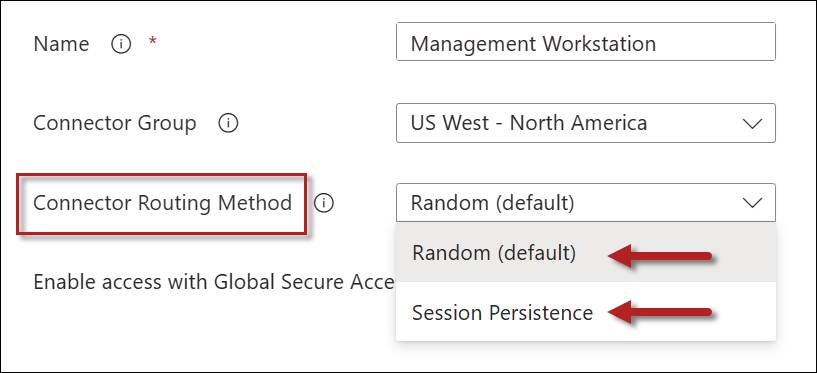
The connector traffic routing method is configured on a per-application basis. Traffic routing methods can be defined on Quick Access or Enterprise applications, and the setting can be configured on the Network access properties tab. Administrators have two options: Random or Session Persistence.
Random
This is the default behavior for the Private Network connector. All new connections are distributed randomly among connectors in the connector group.
Session Persistence
Selecting the Session Persistence option consistently routes requests from the same user and device to the connector on which the session was established.
Connector Routing Method Comparison
The following table summarizes these configuration options.
Routing Method
Benefits
Considerations
Random
Better distribution across connectors in a connector group
Source IP address may change between connections
Session Persistence
Consistent connector egress IP address
May not distribute sessions as evenly as the Random method
Failover
If the preferred connector becomes unavailable, subsequent traffic may be routed through another available connector. Applications that depend on the connector’s source IP address might require the user to establish a new session.
GSA Applications Only
Session persistence applies only to Global Secure Access applications. It is not supported for applications published using Microsoft Entra Application Proxy.
Summary
By default, Microsoft Entra Private Access distributes requests randomly among available connectors. Although this provides load distribution, it can create problems for applications that depend on a consistent connector source IP address. Session persistence addresses this issue by consistently routing traffic from the same user and device through the same connector for the duration of the session. This feature applies only to Global Secure Access applications and is not supported for Microsoft Entra Application Proxy applications.
The Microsoft Entra Global Secure Access (GSA) client is commonly deployed using Microsoft Intune. To deploy the client as an Intune Win32 app, administrators package the installer and a PowerShell installation script into an .intunewin file. Microsoft provides a sample PowerShell script that creates a log, configures Windows to prefer IPv4 over IPv6, and launches the installer. However, the sample has several limitations that can make it unreliable in production environments. To address these shortcomings, I’ve refactored the code to make it more robust and better aligned with enterprise deployment best practices.
Preserved the existing DisabledComponents setting. Microsoft’s example overwrites the entire registry value, potentially removing previously configured settings. My version sets the 0x20 bit to prefer IPv4 while preserving any other flags already present.
Validates the installer’s Authenticode signature. My revised script verifies that the installer has a valid Authenticode signature and that the signing certificate identifies Microsoft Corporation as the publisher.
Preserves the pending reboot state. My script records when the registry setting was changed and compares that timestamp with the device’s last boot time. If the device has not restarted, subsequent runs continue to return exit code 3010, even if an earlier installation attempt failed.
Expanded exit-code handling. The script writes a timestamped PowerShell transcript to the Intune Management Extension log directory, allowing it to be included with collected Intune diagnostics. Logging failures do not prevent the installation from continuing.
Intune-integrated logging. I’ve updated the script’s logging to use the Intune Management Extensions logs folder, so logs are captured by Intune’s diagnostics collection. Each run of the script generates its own timestamped log file, making troubleshooting easier. Also, logging failures never block installation.
Best practice alignment. I’ve added comment-based help, culture-invariant timestamps, and a $PSScriptRoot guard with a clean error to handle script execution issues. In addition, the script is digitally signed to support environments that enforce signed-script execution policies.
GitHub
I’ve published my refactored GSA client installation script on GitHub. You can download the script here:
Note: The script expects the installer to be named GlobalSecureAccessInstaller.exe. However, downloaded installers typically include the version number in the filename, such as GlobalSecureAccessInstaller_<version>.exe. Before creating the .intunewin package, either rename the installer or update the $InstallerName variable in the script.
Contribute
Suggestions and contributions are welcome. If you have ideas for making the GSA client deployment more robust or reliable, please submit a pull request on GitHub.
Summary
Microsoft provides a PowerShell script to deploy the Entra GSA client via Intune, but it has several limitations. This refactored version preserves existing registry settings, validates the installer, improves reboot and exit-code handling, integrates logging with Intune diagnostics, and better aligns with enterprise deployment best practices.